
What I'm Running on My NAS: My Self-Hosted Stack
NOTE
Key takeaway: simple systems and clear defaults make execution easier.

Photo from Unsplash.
What I'm Running on My NAS: My Self-Hosted Stack
After setting up my NAS during winter break, I'm now building it out. Here's what I'm actually running on it.
I use other projects too. I'll share more about them later. In the meantime, here's what I'm using heavily after setting up.
The Stack
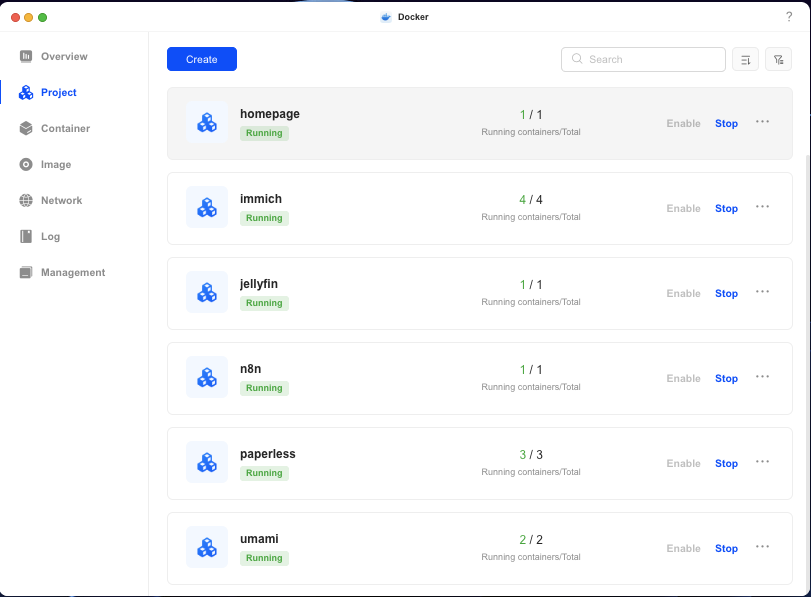
Docker
Containerization for all my self-hosted apps. Makes everything manageable, isolated, and easy to update.
Why Docker:
- Easy deployment of self-hosted apps
- Isolated containers
- Easy updates and management
- Standard way to run services
How I Use It: Runs Immich, n8n, and other self-hosted services on my NAS. Makes everything manageable. Without Docker, running multiple services would be much harder.
Current setup: Docker is the foundation of my self-hosted setup. Essential infrastructure. Makes everything work together.
Immich
Replaced Google Photos and Dropbox. I'm liking it even better than Synology's and UGreen's stock photo app. It took a while to organize ~800GB of photos and videos. Currently loving the AI-powered organization, self-hosted, and of course...no subscription fees.
Why Immich:
- Privacy and control over my photos
- No cloud storage fees
- Self-hosted on my NAS
- AI-powered organization
- Access from anywhere via Tailscale
How I Use It: All my photos and videos are on my NAS, organized by Immich. Replaced Google Photos completely. The deduplication process is happening in the background—Immich is going through my ~800GB library.
The Reality: Immich is my photo management system. It's free, open source, and runs on my NAS. No subscription, no cloud dependency. Just my photos, on my hardware, accessible from anywhere.
n8n
Self-hosted workflow automation. Think Zapier, but running on my own hardware. Automate tasks, connect services, and build workflows without cloud dependencies.
Why n8n:
- Self-hosted workflow automation
- No cloud dependency
- Connect services and APIs
- Visual workflow builder
- Open source and free
How I Use It: Automating tasks between my self-hosted services and external APIs. Building workflows that run on my NAS, keeping everything local and private. Replacing cloud-based automation tools with self-hosted alternatives.
The Reality: n8n is my workflow automation platform. It's free, open source, and runs on my NAS. No subscription fees, no cloud dependency. Just my workflows, on my hardware, accessible from anywhere via Tailscale.
Tailscale
Remote access via secure VPN. Access my NAS from anywhere without complex VPN setup. Free for personal use.
Why Tailscale:
- Secure remote access to my NAS
- Access from anywhere
- Secure connection
- Easy to set up
- No need for complex VPN configuration
How I Use It: Connects my devices to my NAS securely. Access Immich, Docker containers, n8n, and other self-hosted services from anywhere. Works seamlessly.
The Reality: Tailscale makes my self-hosted setup accessible. It's free for personal use, and it just works. Essential for my NAS setup.
Why This Stack?
-
Privacy - My data stays local. No cloud dependency. No third-party access.
-
Control - I own my data. I control my storage. I decide what runs where
-
Cost - Cutting subscription costs. One-time hardware investment vs. monthly fees.
-
Open Source - All the tools I'm using are open source. Supporting the community while getting great software.
-
Accessibility - Tailscale makes it all accessible from anywhere. Secure connection, easy setup.
What's Working
The setup is working well. Immich is going through my photos in the background (organizing ~800GB...yes that's all the screenshots, selfies, and extra photos of the same pose). Docker makes managing everything simple. Tailscale gives me secure remote access without the complexity of traditional VPNs. n8n is handling my workflow automation, replacing cloud-based tools with self-hosted alternatives.
I can access my photos, documents, and self-hosted apps from anywhere. All secure. All private. All mine.
What's Next
Next up: sharing the actual setup process and what I'd do differently. The migration took longer than expected (as I mentioned in my previous post about setting up during winter break). The deduplication process is ongoing. But it's working, and I'm learning as I go.
More to come on the build process, lessons learned, and what I'd do differently if I started over.